Introduction
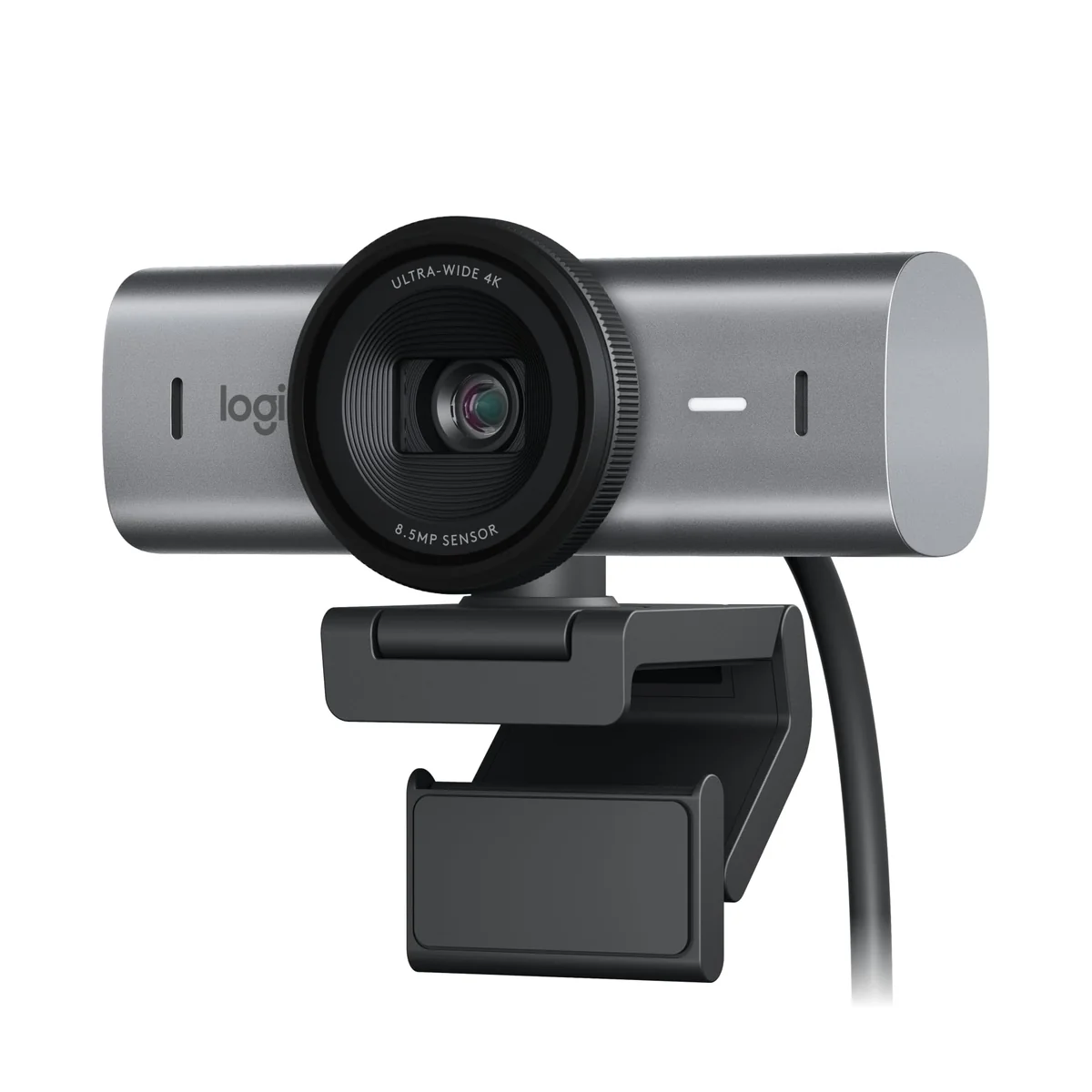
When you're looking for a webcam that can handle both your professional and personal needs, the Logitech MX Brio Ultra HD 4K Collaboration is a top contender. With its 4K resolution and advanced features, it stands out from the crowd. But is it worth the premium price tag? Let's dive in and find out.
The MX Brio is designed to meet or exceed the demands of both home and office settings. Whether you're a video conferencer, a digital artist, or someone who just wants to look their best in Zoom calls, this webcam has got you covered. It's not just about the resolution; it's about how it handles everything from low light to background noise. Let's break it down.
Who Is This For?
Great Choice If:
- You're a professional who spends a lot of time in video conferences. The MX Brio’s 4K resolution and advanced AI features ensure you look your best, no matter the lighting conditions.
- You’re a digital artist or a content creator. The ability to tilt down the camera to share your work and the fine control over settings makes it perfect for showing off your projects in real-time.
- You want the best possible image quality for both video calls and live streams. The 4K resolution and advanced sensor technology deliver sharp and clear images.
Might Disappoint If:
- You're looking for the most budget-friendly option. While the MX Brio is a top-of-the-line webcam, it’s not for those on a tight budget. It falls into the premium tier.
- You're not comfortable with adjusting settings manually. The MX Brio offers a lot of fine-grain control, which can be overwhelming if you prefer a more automated experience.
Highlights
The Logitech MX Brio Ultra HD 4K Collaboration is packed with features that make it a standout product. Here’s a closer look at what it can do:
- Ultra HD 4K Resolution: The webcam can capture 4K video at 30fps or 1080p at 60fps. This ensures that you get incredibly detailed and clear images, even in low light.
- Advanced AI Features: With auto-exposure, auto white balance, noise reduction, and autofocus, the webcam handles tricky lighting conditions with ease. The AI-enhanced image quality makes your face stand out, even in challenging lighting.
- Customizable Settings: You can fine-tune the image quality with controls like ISO, Shutter Speed, Tint, and Vibrance. This gives you the flexibility to adjust the image according to your needs.
- Dual Beamforming Microphones: These microphones are designed to reduce background noise and enhance your voice. The AI helps in making sure you sound clear and audible.
- Show Mode: This feature allows you to tilt the camera down to share notes, sketches, or any work on your desk. It’s perfect for showing your work during calls or presentations.
In Action
In real-world use, the MX Brio performs exceptionally well. The 4K resolution is noticeable, especially when you're working in low light. The AI-enhanced features make a significant difference, ensuring that your face is always well-lit and clear. The dual beamforming microphones work wonders in noisy environments, making sure your voice is heard clearly.
The ability to adjust settings manually is a double-edged sword. On one hand, it gives you precise control over your image quality. On the other hand, it can be a bit overwhelming if you're not familiar with the settings. However, the Auto mode does a fantastic job of handling most situations, making it very user-friendly for those who prefer a simpler approach.
What We Love and What Could Be Better
Thumbs Up:
- Advanced Image Quality: The 4K resolution and AI-enhanced features make a huge difference in how you look on camera.
- Customization: Fine controls allow for precise adjustments to suit your specific needs.
- Dual Beamforming Microphones: The AI helps in reducing background noise and improving voice clarity.
- Show Mode: This feature is incredibly useful for sharing work during calls.
Drawbacks:
- Steep Price: At the premium tier, it may not be the best choice for those on a budget.
- Complexity for Beginners: The manual settings can be intimidating for users who prefer a more automated experience.
Is It Worth It?
Given its advanced features and high-quality performance, the Logitech MX Brio Ultra HD 4K Collaboration is definitely worth the investment. If you’re someone who values image quality and is willing to invest in a premium product, this is a no-brainer. However, if you’re looking for a more budget-friendly option, there are other webcams that might suit your needs better.
Conclusion
The Logitech MX Brio Ultra HD 4K Collaboration is an outstanding webcam that delivers on all fronts. Its advanced features, particularly the 4K resolution and AI-enhanced image quality, make it a top choice for professionals and content creators. While it may be on the pricier side, the quality and performance justify the cost. If you're willing to pay the premium, the MX Brio is a fantastic choice for anyone who wants the best possible webcam experience.