Introduction
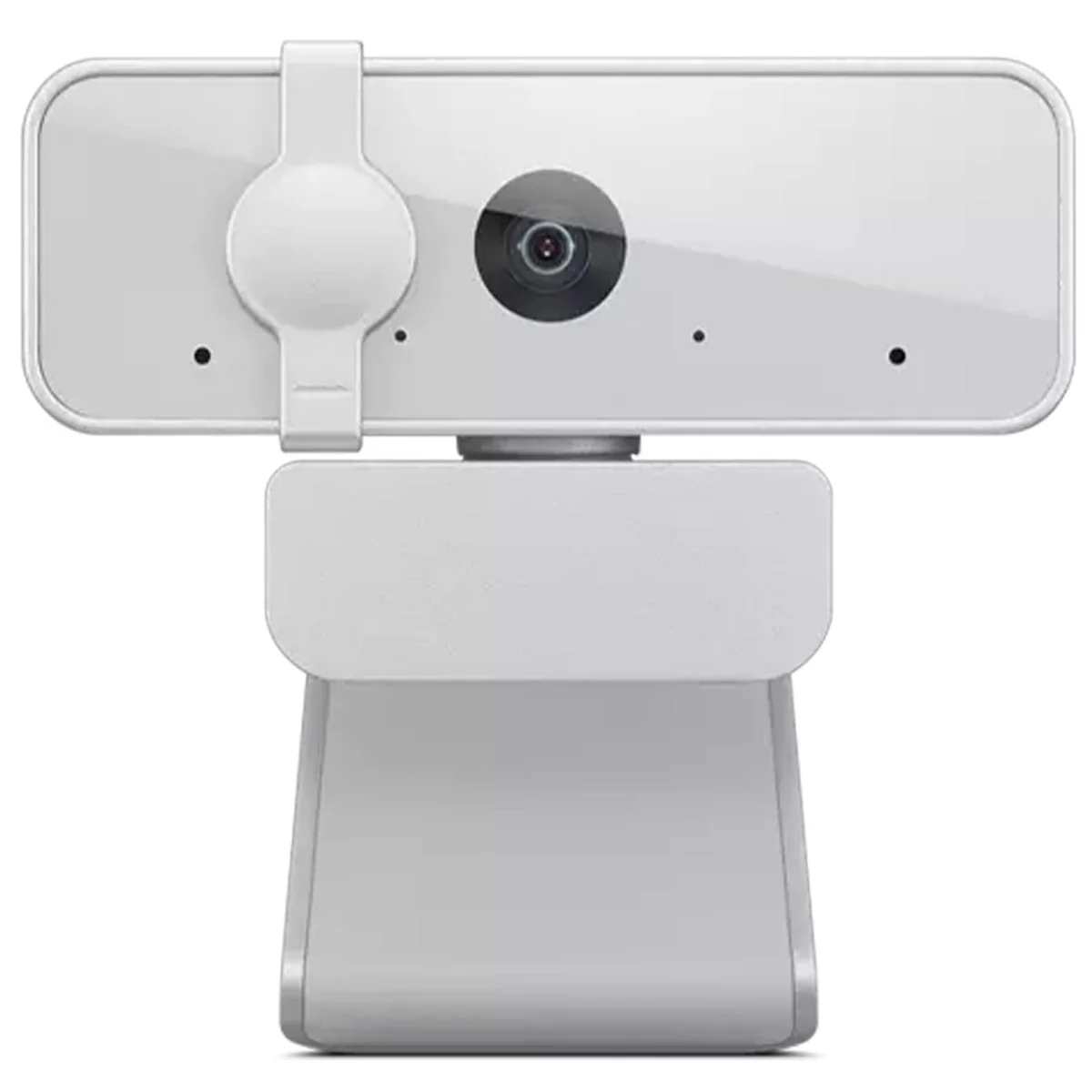
When it comes to webcams, there’s a lot of competition out there. From high-end models with advanced features to budget-friendly options that still deliver good performance, the market is diverse. If you’re on a tight budget but still want a webcam that delivers clear and reliable video, the Lenovo HD 1080p Webcam (300 FHD) is a standout choice. This budget-friendly webcam is packed with features that make it perfect for everyday use, whether you’re attending virtual meetings, streaming, or simply staying in touch with friends and family.
This webcam is designed to provide you with the best possible experience without breaking the bank. It's a solid pick for anyone who needs a reliable webcam for daily use. With its 1080p resolution, wide-angle lens, and plug-and-play connectivity, it's easy to see why this webcam has garnered such a positive reception.
Notable Features
The Lenovo HD 1080p Webcam (300 FHD) is not just a simple webcam; it’s a versatile tool that can handle a variety of tasks. Here are some of its key features:
-
Full HD 1080p Clarity: This is a feature that can't be overlooked. The 2.1-megapixel CMOS camera delivers stunning full HD 1080p resolution at 30 frames per second (fps). That means every detail is captured with crystal-clear sharpness, making it perfect for video conferences, online classes, and even content creation. Whether you're working from home or just staying in touch with loved ones, this webcam ensures that your visuals are top-notch.
-
Wide-Angle Lens: The 95-degree wide-angle lens is a game-changer. It allows you to capture more of the scene in a single frame, which is great for video calls where multiple people are in the shot. Whether you're in a small home office or a large living room, this lens helps ensure everyone is included in the frame. It’s also perfect for streaming content or recording videos where you want to capture a broader view.
-
Convenient Plug-and-Play Connectivity: This webcam is designed to be user-friendly. All you need to do is plug it into your Windows or Mac device via USB 2.0, and it’s ready to go. The UVC (USB Video Class) encode ensures compatibility with a wide range of video conferencing software and operating systems, so you won’t have to worry about compatibility issues. This simplicity is a huge plus, especially for those who might not be tech-savvy.
-
Flexible Tilt and Rotation: The webcam’s ability to tilt and rotate 360 degrees is a fantastic feature. It allows you to adjust the angle easily to get the perfect shot. Whether you need to change the angle for a better view or just want to look more comfortable during a call, this flexibility is invaluable. It’s perfect for home offices or small spaces where you can’t move the camera.
-
Crystal Clear Audio: While many webcams focus solely on video quality, the Lenovo 300 FHD also delivers clear audio. The 2 integrated full-stereo dual microphones ensure that your voice comes through loud and clear, whether you’re in a quiet home office or a bustling kitchen. This is especially important for video calls where good audio can make or break the experience.
Hands-On Experience
Putting the Lenovo HD 1080p Webcam (300 FHD) to the test, it delivers on its promise of quality and ease of use. Here’s what I found:
-
Video Quality: In a variety of lighting conditions, the webcam maintained clear and sharp images. The 1080p resolution is evident, making it easy to see every detail, whether it’s your face or the background. The 30fps frame rate ensures that the video is smooth and not choppy, which is especially noticeable during video conferences.
-
Wide-Angle Lens: The wide-angle lens worked well in different settings. In a small home office, it captured the entire workspace, making it easy for all participants to see each other. In a larger room, it provided a balanced view, ensuring that no one was cut off from the frame. It’s a great feature for collaborative meetings or group calls.
-
Plug-and-Play Connectivity: Connecting the webcam to my computer was a breeze. The USB 2.0 port is reliable, and the UVC compatibility made sure that it worked seamlessly with my video conferencing software. I didn’t encounter any issues during setup, and it was ready to use right away.
-
Tilt and Rotation: The tilt and rotation features were intuitive and easy to use. I could adjust the angle quickly to get the best shot, and the 360-degree rotation was particularly useful for different scenarios. Whether I needed to look more comfortable during a call or just wanted a better angle, the webcam’s flexibility was a big plus.
-
Audio Quality: The dual microphones performed well, capturing clear and crisp audio. Even in noisy environments, the sound remained intelligible. The audio was balanced and didn’t have any feedback issues, which is a common problem with many webcams.
Pros and Cons
Thumbs Up:
- Crystal-Sharp Video: The 1080p resolution and 30fps frame rate provide sharp and clear visuals.
- Wide-Angle Lens: Captures more of the scene, making it perfect for group calls or larger spaces.
- Plug-and-Play: Easy to set up and compatible with a wide range of software.
- Adjustable Tilt and Rotation: Great for finding the perfect angle and ensuring a comfortable view.
The Not-So-Good:
- Limited Features: While it has a wide-angle lens, it doesn’t have advanced features like facial recognition or noise cancellation.
- No Headset Microphone: If you need a more robust audio solution, you might need to use an external microphone.
Who Should Buy This?
Great Choice If:
- You're on a tight budget but need a reliable webcam for daily use.
- You need a webcam for video conferencing or online streaming.
- You want a webcam that is easy to set up and use.
Consider Alternatives If:
- You need a webcam with advanced features like noise cancellation or facial recognition.
- You require a higher resolution for more detailed work.
Wrapping Up
The Lenovo HD 1080p Webcam (300 FHD) is a fantastic choice if you’re looking for a budget-friendly webcam that delivers clear and reliable performance. It’s easy to set up, offers great video quality, and has a wide-angle lens that works well in various settings. While it might not have all the advanced features found in higher-end models, its simplicity and reliability make it a solid pick for everyday use.
If you’re on a budget and need a webcam that works well for your daily needs, the Lenovo HD 1080p Webcam (300 FHD) is definitely worth considering. It’s a great value that won’t let you down.